
Enable Clipboard: Unlocking the Power of Copy and Paste on Disabled Websites

Enable Clipboard is an open-source Chrome extension developed by s1n7ax. This free program is designed to enable clipboard and context menu functionality on disabled websites.

Many banking websites disable copy and paste actions, making it a nightmare to type in long passwords and bank account numbers. However, with Enable Clipboard, you can stop the propagation of 'contextmenu', 'copy', and 'paste' events, preventing websites from preventing the default behavior.

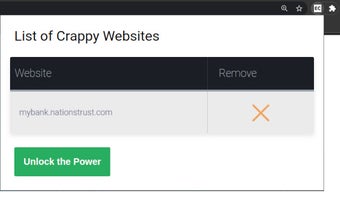
To use Enable Clipboard, simply install the plugin and navigate to the website where you want to enable the clipboard and context menu. Click on the plugin action icon and then click on the "Unlock the Power" button to add the website to the whitelist. After reloading the page, you'll be able to freely copy and paste.

Please note that there are some limitations to this extension. If the actions are registered in the capturing phase, the plugin may not work. If you encounter any issues, you can create a GitHub issue and provide the details.

With Enable Clipboard, you can regain control over copy and paste functionality on disabled websites, making your online experience more convenient and efficient.

 0/1

App specs

  • License

    Free

  • Version

    1.0

  • Latest update

  • Platform

    chrome

  • Developer

Program available in other languages


User reviews about Enable Clipboard

Have you tried Enable Clipboard? Be the first to leave your opinion!

Add review

Top extensions for Google Chrome

Top downloads Add-ons & Tools for Google Chrome

Top downloads Add-ons & Tools for Google Chrome

Top downloads Add-ons & Tools for Google Chrome

Related topics about Enable Clipboard

You may also like

Explore Apps

Latest articles

Laws concerning the use of this software vary from country to country. We do not encourage or condone the use of this program if it is in violation of these laws.
Softonic

Is Enable Clipboard safe?

100/100

Score result: Clean

This file passed a comprehensive security scan using VirusTotal technology. It is safe to download.

  • Virus free
  • Spyware free
  • Malware free
  • Verified by Security Partners

    VirusTotal logo

Scan Info

Last scan
Thursday, November 16, 2023
Scan provider
VirusTotal

Softonic security commitment

Enable Clipboard has been thoroughly scanned by our advanced security systems and verified by industry-leading partners. This file comes from the official developer and has passed all our security checks, showing no signs of viruses, malware, or spyware. For more information, visit our Security and Trust Center